No products in the cart.


Foxco has an ecommerce and digital marketing client who sells vitamins, supplements and high end nutraceutical type products. Some of these products are sold by distributors who for reasons I cannot understand mandate that the end user calls in to order their products. Pretty silly but hey our job isn't to judge, it's to solve problems.
As usual I'll start by seeing if someone else has built a decent, lightweight free plugin that checks all the boxes.
Next I'll see if a little bit of PHP will solve it but when it starts to involve all kinds of variables, preferences and styles-- and something our client might want direct control of i'll make a plugin. And sometimes I share these plugins here with you good people totally free of charge.
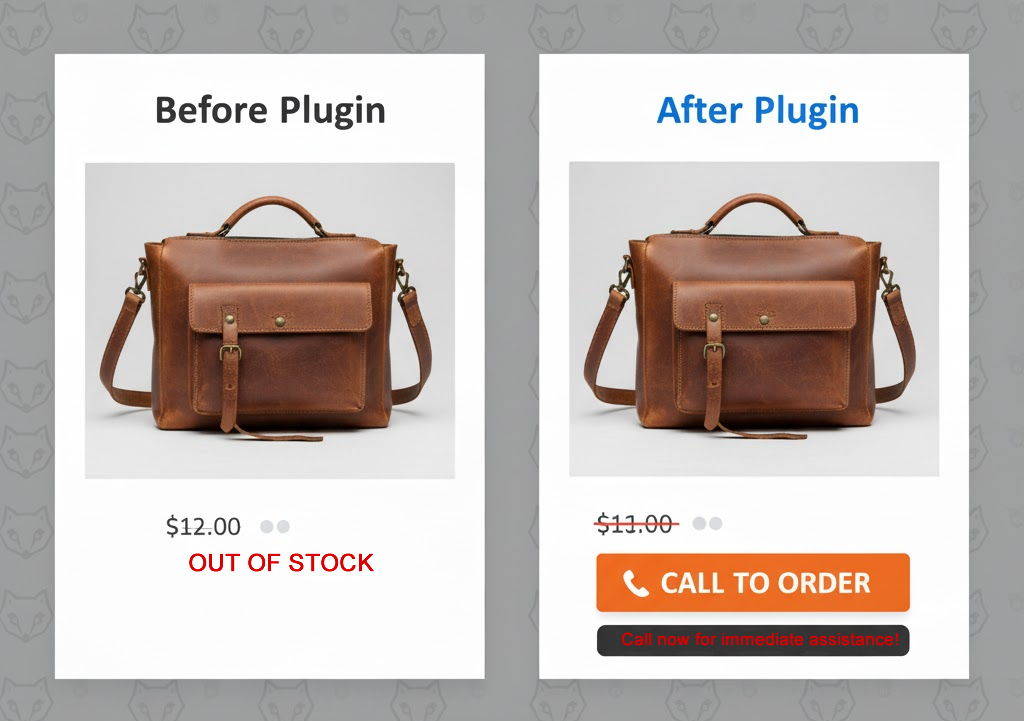
So in WooCommerce the Add To Cart button infrastructure is pretty circumscribed and rigid, but I think this plugin does a pretty nice job of allowing you to mark products as Out Of Stock when you want someone to call in or perhaps even click a link and order somewhere else (if you have an affiliate situation going on with a distributor).
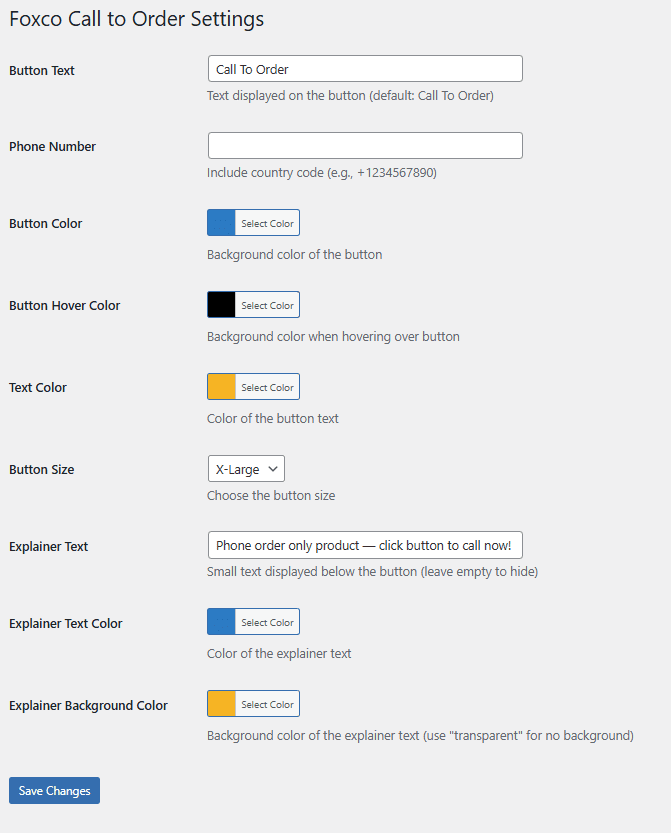
Simple UI below
Obligatory explainer and instructions
Features
Installation
/wp-content/plugins/ directoryUsage
Once activated, the plugin automatically detects out-of-stock products and replaces the unavailable message with your custom call button. No shortcodes or manual placement needed.
Customization Options
Navigate to Settings > Call to Order to access all customization options:
Requirements
Support
Built by Foxco for real businesses that know sometimes the best shopping cart is a good conversation.

Questions or issues? Need help with something else? Email us [email protected]
THE CODE
<?php
/**
* Plugin Name: WooCommerce Call to Order Button (Foxco)
* Plugin URI: https://www.foxco.net
* Description: Replace out of stock products with a customizable "Call to Order" button with phone link
* Version: 1.8.8
* Author: Foxco
* Author URI: https://www.foxco.net
* Text Domain: wc-call-to-order
* Requires at least: 5.0
* Requires PHP: 7.0
* WC requires at least: 3.0
* WC tested up to: 9.0
*/
// Exit if accessed directly
if (!defined('ABSPATH')) {
exit;
}
// Declaring WooCommerce HPOS compatibility
add_action('before_woocommerce_init', function() {
if (class_exists('Automattic\WooCommerce\Utilities\FeaturesUtil')) {
Automattic\WooCommerce\Utilities\FeaturesUtil::declare_compatibility('custom_order_tables', __FILE__, true);
Automattic\WooCommerce\Utilities\FeaturesUtil::declare_compatibility('cart_checkout_blocks', __FILE__, true);
}
});
class WC_Call_To_Order {
public function __construct() {
// Add admin menu
add_action('admin_menu', array($this, 'add_admin_menu'));
add_action('admin_init', array($this, 'register_settings'));
// Frontend hooks
add_action('wp_footer', array($this, 'add_call_button_script'));
add_action('wp_head', array($this, 'add_button_styles'));
}
public function add_admin_menu() {
add_options_page(
'Foxco Call to Order Settings',
'Foxco Call to Order',
'manage_options',
'wc-call-to-order',
array($this, 'settings_page')
);
}
public function register_settings() {
register_setting('wc_call_to_order_settings', 'wcto_button_text');
register_setting('wc_call_to_order_settings', 'wcto_phone_number');
register_setting('wc_call_to_order_settings', 'wcto_button_color');
register_setting('wc_call_to_order_settings', 'wcto_button_hover_color');
register_setting('wc_call_to_order_settings', 'wcto_text_color');
register_setting('wc_call_to_order_settings', 'wcto_button_size');
register_setting('wc_call_to_order_settings', 'wcto_explainer_text');
register_setting('wc_call_to_order_settings', 'wcto_explainer_text_color');
register_setting('wc_call_to_order_settings', 'wcto_explainer_bg_color');
}
public function settings_page() {
?>
<div class="wrap">
<h1>Foxco Call to Order Settings</h1>
<form method="post" action="options.php">
<?php settings_fields('wc_call_to_order_settings'); ?>
<table class="form-table">
<tr>
<th scope="row">
<label for="wcto_button_text">Button Text</label>
</th>
<td>
<input type="text"
id="wcto_button_text"
name="wcto_button_text"
value="<?php echo esc_attr(get_option('wcto_button_text', 'Call To Order')); ?>"
class="regular-text" />
<p class="description">Text displayed on the button (default: Call To Order)</p>
</td>
</tr>
<tr>
<th scope="row">
<label for="wcto_phone_number">Phone Number</label>
</th>
<td>
<input type="text"
id="wcto_phone_number"
name="wcto_phone_number"
value="<?php echo esc_attr(get_option('wcto_phone_number', '+1234567890')); ?>"
class="regular-text" />
<p class="description">Include country code (e.g., +1234567890)</p>
</td>
</tr>
<tr>
<th scope="row">
<label for="wcto_button_color">Button Color</label>
</th>
<td>
<input type="text"
id="wcto_button_color"
name="wcto_button_color"
value="<?php echo esc_attr(get_option('wcto_button_color', '#0073aa')); ?>"
class="color-picker" />
<p class="description">Background color of the button</p>
</td>
</tr>
<tr>
<th scope="row">
<label for="wcto_button_hover_color">Button Hover Color</label>
</th>
<td>
<input type="text"
id="wcto_button_hover_color"
name="wcto_button_hover_color"
value="<?php echo esc_attr(get_option('wcto_button_hover_color', '#005177')); ?>"
class="color-picker" />
<p class="description">Background color when hovering over button</p>
</td>
</tr>
<tr>
<th scope="row">
<label for="wcto_text_color">Text Color</label>
</th>
<td>
<input type="text"
id="wcto_text_color"
name="wcto_text_color"
value="<?php echo esc_attr(get_option('wcto_text_color', '#ffffff')); ?>"
class="color-picker" />
<p class="description">Color of the button text</p>
</td>
</tr>
<tr>
<th scope="row">
<label for="wcto_button_size">Button Size</label>
</th>
<td>
<select id="wcto_button_size" name="wcto_button_size">
<?php
$current_size = get_option('wcto_button_size', 'medium');
$sizes = array(
'x-small' => 'X-Small',
'small' => 'Small',
'medium' => 'Medium',
'large' => 'Large',
'x-large' => 'X-Large'
);
foreach ($sizes as $value => $label) {
$selected = ($current_size === $value) ? 'selected' : '';
echo '<option value="' . esc_attr($value) . '" ' . $selected . '>' . esc_html($label) . '</option>';
}
?>
</select>
<p class="description">Choose the button size</p>
</td>
</tr>
<tr>
<th scope="row">
<label for="wcto_explainer_text">Explainer Text</label>
</th>
<td>
<input type="text"
id="wcto_explainer_text"
name="wcto_explainer_text"
value="<?php echo esc_attr(get_option('wcto_explainer_text', '')); ?>"
class="regular-text"
placeholder="e.g., Available for special order" />
<p class="description">Small text displayed below the button (leave empty to hide)</p>
</td>
</tr>
<tr>
<th scope="row">
<label for="wcto_explainer_text_color">Explainer Text Color</label>
</th>
<td>
<input type="text"
id="wcto_explainer_text_color"
name="wcto_explainer_text_color"
value="<?php echo esc_attr(get_option('wcto_explainer_text_color', '#666666')); ?>"
class="color-picker" />
<p class="description">Color of the explainer text</p>
</td>
</tr>
<tr>
<th scope="row">
<label for="wcto_explainer_bg_color">Explainer Background Color</label>
</th>
<td>
<input type="text"
id="wcto_explainer_bg_color"
name="wcto_explainer_bg_color"
value="<?php echo esc_attr(get_option('wcto_explainer_bg_color', 'transparent')); ?>"
class="color-picker" />
<p class="description">Background color of the explainer text (use "transparent" for no background)</p>
</td>
</tr>
</table>
<?php submit_button(); ?>
</form>
</div>
<script type="text/javascript">
jQuery(document).ready(function($) {
$('.color-picker').wpColorPicker();
});
</script>
<?php
}
public function add_call_button_script() {
if (!class_exists('WooCommerce')) {
return;
}
$button_text = get_option('wcto_button_text', 'Call To Order');
$phone_number = get_option('wcto_phone_number', '+1234567890');
$explainer_text = get_option('wcto_explainer_text', '');
?>
<script type="text/javascript">
jQuery(document).ready(function($) {
var phoneNumber = '<?php echo esc_js($phone_number); ?>';
var buttonText = '<?php echo esc_js($button_text); ?>';
var explainerText = '<?php echo esc_js($explainer_text); ?>';
var buttonHTML = '<a href="tel:' + phoneNumber + '" class="button wcto-call-button">' + buttonText + '</a>';
if (explainerText) {
buttonHTML += '<div class="wcto-explainer-text">' + explainerText + '</div>';
}
// Replace out of stock text with button
$('body').find('.out-of-stock, .stock.out-of-stock, p.stock.out-of-stock').each(function() {
var text = $(this).text().trim().toLowerCase();
if (text === 'out of stock' || text.includes('out of stock')) {
$(this).html(buttonHTML);
}
});
// For product loops
$('.product').each(function() {
if ($(this).find('.out-of-stock, .outofstock').length > 0) {
var addToCartBtn = $(this).find('a.button, .add_to_cart_button, .added_to_cart');
if (addToCartBtn.length > 0) {
addToCartBtn.replaceWith(buttonHTML);
} else {
$(this).find('.out-of-stock').first().html(buttonHTML);
}
}
});
// Single product page
if ($('body').hasClass('single-product')) {
if ($('.stock.out-of-stock').length > 0) {
$('.single_add_to_cart_button').replaceWith('<div class="cart">' + buttonHTML + '</div>');
$('.stock.out-of-stock').html(buttonHTML);
}
}
});
</script>
<?php
}
public function add_button_styles() {
$button_color = get_option('wcto_button_color', '#0073aa');
$button_hover_color = get_option('wcto_button_hover_color', '#005177');
$text_color = get_option('wcto_text_color', '#ffffff');
$button_size = get_option('wcto_button_size', 'medium');
$explainer_text_color = get_option('wcto_explainer_text_color', '#666666');
$explainer_bg_color = get_option('wcto_explainer_bg_color', 'transparent');
// Define size presets
$sizes = array(
'x-small' => array('padding' => '6px 12px', 'font-size' => '12px'),
'small' => array('padding' => '8px 16px', 'font-size' => '13px'),
'medium' => array('padding' => '10px 20px', 'font-size' => '14px'),
'large' => array('padding' => '12px 24px', 'font-size' => '16px'),
'x-large' => array('padding' => '14px 28px', 'font-size' => '18px')
);
$current_size = isset($sizes[$button_size]) ? $sizes[$button_size] : $sizes['medium'];
?>
<style>
.wcto-call-button {
background-color: <?php echo esc_attr($button_color); ?> !important;
color: <?php echo esc_attr($text_color); ?> !important;
text-decoration: none !important;
display: inline-block !important;
border: none !important;
cursor: pointer !important;
text-align: center !important;
font-weight: 600 !important;
line-height: 1.4 !important;
border-radius: 4px !important;
padding: <?php echo esc_attr($current_size['padding']); ?> !important;
font-size: <?php echo esc_attr($current_size['font-size']); ?> !important;
transition: background-color 0.3s ease !important;
}
.wcto-call-button:hover {
background-color: <?php echo esc_attr($button_hover_color); ?> !important;
color: <?php echo esc_attr($text_color); ?> !important;
}
.wcto-explainer-text {
font-size: 12px !important;
font-weight: 700 !important;
color: <?php echo esc_attr($explainer_text_color); ?> !important;
background-color: <?php echo esc_attr($explainer_bg_color); ?> !important;
margin-top: 8px !important;
padding: 6px 10px !important;
text-align: center !important;
line-height: 1.4 !important;
border-radius: 3px !important;
display: inline-block !important;
}
</style>
<?php
}
}
// Initialize plugin.. enjoy, AF
new WC_Call_To_Order();
// Add settings link on plugin page
add_filter('plugin_action_links_' . plugin_basename(__FILE__), 'wcto_add_settings_link');
function wcto_add_settings_link($links) {
$settings_link = '<a href="options-general.php?page=wc-call-to-order">Settings</a>';
array_unshift($links, $settings_link);
return $links;
}
// Add color picker support in admin
add_action('admin_enqueue_scripts', 'wcto_enqueue_color_picker');
function wcto_enqueue_color_picker($hook) {
if ($hook !== 'settings_page_wc-call-to-order') {
return;
}
wp_enqueue_style('wp-color-picker');
wp_enqueue_script('wp-color-picker');
}
?>