

Skip to content
Fox Consulting - Foxco
Blog

Menu

Work

  • clients
  • tools
  • reach
  • news

Tech

  • wordpress
  • shopify
  • woocommerce
  • ecommerce
  • hosting
  • shift4shop

Marketing

  • google ads
  • seo aeo
  • amazon
  • fractional cmo
Foxco//Article

    Written by

    Foxco has an ecommerce and digital marketing client who sells vitamins, supplements and high end nutraceutical type products. Some of these products are sold by distributors who for reasons I cannot understand mandate that the end user calls in to order their products. Pretty silly but hey our job isn't to judge, it's to solve problems.

    As usual I'll start by seeing if someone else has built a decent, lightweight free plugin that checks all the boxes.

    Next I'll see if a little bit of PHP will solve it but when it starts to involve all kinds of variables, preferences and styles-- and something our client might want direct control of i'll make a plugin. And sometimes I share these plugins here with you good people totally free of charge.

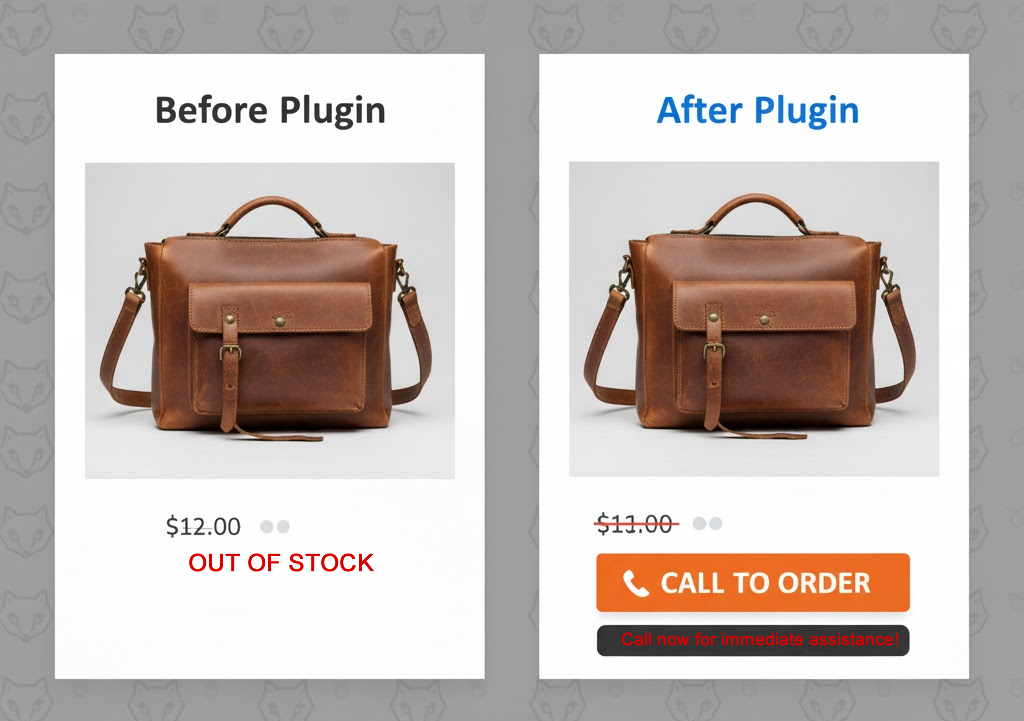
    So in WooCommerce the Add To Cart button infrastructure is pretty circumscribed and rigid, but I think this plugin does a pretty nice job of allowing you to mark products as Out Of Stock when you want someone to call in or perhaps even click a link and order somewhere else (if you have an affiliate situation going on with a distributor).

    Simple UI below
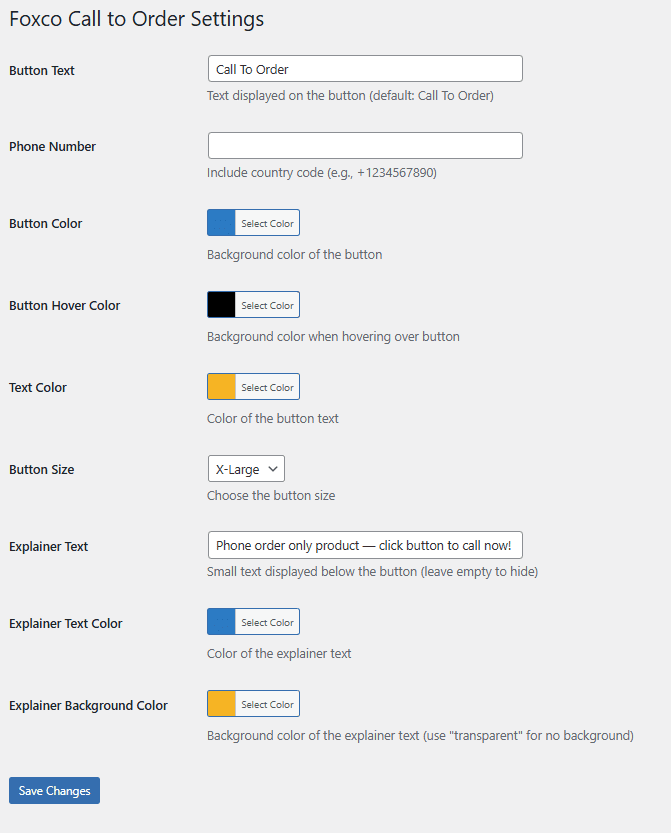
    Obligatory explainer and instructions

    Features

    • Automatically replaces "Out of Stock" text with a customizable call button
    • Works on shop pages, product archives, and single product pages
    • Click-to-call telephone links work on all devices
    • Fully customizable button text
    • Five button size options (X-Small through X-Large)
    • Custom button colors with color picker
    • Custom hover colors for better interactivity
    • Optional explainer text below the button
    • Explainer text color and background customization
    • Compatible with Elementor and other page builders
    • Works with WooCommerce HPOS and modern cart features
    • Zero configuration required - works right out of the box
    • Lightweight and fast - uses minimal JavaScript

    Installation

    1. Upload the plugin file to /wp-content/plugins/ directory
    2. Activate the plugin through the 'Plugins' menu in WordPress
    3. Go to Settings > Foxco Call to Order to configure your options
    4. Enter your phone number (include country code, e.g., +1234567890)
    5. Customize colors, button size, and text to match your brand
    6. Save changes and test on an out-of-stock product

    Usage

    Once activated, the plugin automatically detects out-of-stock products and replaces the unavailable message with your custom call button. No shortcodes or manual placement needed.

    Customization Options

    Navigate to Settings > Call to Order to access all customization options:

    • Button Text - Change the button label (default: "Call To Order")
    • Phone Number - Your business phone number with country code
    • Button Color - Primary background color for the button
    • Button Hover Color - Color when customers hover over the button
    • Text Color - Color of the text inside the button
    • Button Size - Choose from X-Small, Small, Medium, Large, or X-Large
    • Explainer Text - Optional small text displayed below the button
    • Explainer Text Color - Color of the explainer text
    • Explainer Background - Background color for explainer text (or transparent)

    Requirements

    • WordPress 5.0 or higher
    • WooCommerce 3.0 or higher
    • PHP 7.0 or higher

    Support

    Built by Foxco for real businesses that know sometimes the best shopping cart is a good conversation.

    Click the Fox to download Woo Call To Order Plugin

    Questions or issues? Need help with something else? Email us [email protected]

    THE CODE

    <?php
    /**
     * Plugin Name: WooCommerce Call to Order Button (Foxco)
     * Plugin URI: https://www.foxco.net
     * Description: Replace out of stock products with a customizable "Call to Order" button with phone link
     * Version: 1.8.8
     * Author: Foxco
     * Author URI: https://www.foxco.net
     * Text Domain: wc-call-to-order
     * Requires at least: 5.0
     * Requires PHP: 7.0
     * WC requires at least: 3.0
     * WC tested up to: 9.0
     */
    
    // Exit if accessed directly
    if (!defined('ABSPATH')) {
        exit;
    }
    
    // Declaring WooCommerce HPOS compatibility
    add_action('before_woocommerce_init', function() {
        if (class_exists('Automattic\WooCommerce\Utilities\FeaturesUtil')) {
            Automattic\WooCommerce\Utilities\FeaturesUtil::declare_compatibility('custom_order_tables', __FILE__, true);
            Automattic\WooCommerce\Utilities\FeaturesUtil::declare_compatibility('cart_checkout_blocks', __FILE__, true);
        }
    });
    
    class WC_Call_To_Order {
        
        public function __construct() {
            // Add admin menu
            add_action('admin_menu', array($this, 'add_admin_menu'));
            add_action('admin_init', array($this, 'register_settings'));
            
            // Frontend hooks
            add_action('wp_footer', array($this, 'add_call_button_script'));
            add_action('wp_head', array($this, 'add_button_styles'));
        }
        
        public function add_admin_menu() {
            add_options_page(
                'Foxco Call to Order Settings',
                'Foxco Call to Order',
                'manage_options',
                'wc-call-to-order',
                array($this, 'settings_page')
            );
        }
        
        public function register_settings() {
            register_setting('wc_call_to_order_settings', 'wcto_button_text');
            register_setting('wc_call_to_order_settings', 'wcto_phone_number');
            register_setting('wc_call_to_order_settings', 'wcto_button_color');
            register_setting('wc_call_to_order_settings', 'wcto_button_hover_color');
            register_setting('wc_call_to_order_settings', 'wcto_text_color');
            register_setting('wc_call_to_order_settings', 'wcto_button_size');
            register_setting('wc_call_to_order_settings', 'wcto_explainer_text');
            register_setting('wc_call_to_order_settings', 'wcto_explainer_text_color');
            register_setting('wc_call_to_order_settings', 'wcto_explainer_bg_color');
        }
        
        public function settings_page() {
            ?>
            <div class="wrap">
                <h1>Foxco Call to Order Settings</h1>
                <form method="post" action="options.php">
                    <?php settings_fields('wc_call_to_order_settings'); ?>
                    <table class="form-table">
                        <tr>
                            <th scope="row">
                                <label for="wcto_button_text">Button Text</label>
                            </th>
                            <td>
                                <input type="text" 
                                       id="wcto_button_text" 
                                       name="wcto_button_text" 
                                       value="<?php echo esc_attr(get_option('wcto_button_text', 'Call To Order')); ?>" 
                                       class="regular-text" />
                                <p class="description">Text displayed on the button (default: Call To Order)</p>
                            </td>
                        </tr>
                        <tr>
                            <th scope="row">
                                <label for="wcto_phone_number">Phone Number</label>
                            </th>
                            <td>
                                <input type="text" 
                                       id="wcto_phone_number" 
                                       name="wcto_phone_number" 
                                       value="<?php echo esc_attr(get_option('wcto_phone_number', '+1234567890')); ?>" 
                                       class="regular-text" />
                                <p class="description">Include country code (e.g., +1234567890)</p>
                            </td>
                        </tr>
                        <tr>
                            <th scope="row">
                                <label for="wcto_button_color">Button Color</label>
                            </th>
                            <td>
                                <input type="text" 
                                       id="wcto_button_color" 
                                       name="wcto_button_color" 
                                       value="<?php echo esc_attr(get_option('wcto_button_color', '#0073aa')); ?>" 
                                       class="color-picker" />
                                <p class="description">Background color of the button</p>
                            </td>
                        </tr>
                        <tr>
                            <th scope="row">
                                <label for="wcto_button_hover_color">Button Hover Color</label>
                            </th>
                            <td>
                                <input type="text" 
                                       id="wcto_button_hover_color" 
                                       name="wcto_button_hover_color" 
                                       value="<?php echo esc_attr(get_option('wcto_button_hover_color', '#005177')); ?>" 
                                       class="color-picker" />
                                <p class="description">Background color when hovering over button</p>
                            </td>
                        </tr>
                        <tr>
                            <th scope="row">
                                <label for="wcto_text_color">Text Color</label>
                            </th>
                            <td>
                                <input type="text" 
                                       id="wcto_text_color" 
                                       name="wcto_text_color" 
                                       value="<?php echo esc_attr(get_option('wcto_text_color', '#ffffff')); ?>" 
                                       class="color-picker" />
                                <p class="description">Color of the button text</p>
                            </td>
                        </tr>
                        <tr>
                            <th scope="row">
                                <label for="wcto_button_size">Button Size</label>
                            </th>
                            <td>
                                <select id="wcto_button_size" name="wcto_button_size">
                                    <?php 
                                    $current_size = get_option('wcto_button_size', 'medium');
                                    $sizes = array(
                                        'x-small' => 'X-Small',
                                        'small' => 'Small',
                                        'medium' => 'Medium',
                                        'large' => 'Large',
                                        'x-large' => 'X-Large'
                                    );
                                    foreach ($sizes as $value => $label) {
                                        $selected = ($current_size === $value) ? 'selected' : '';
                                        echo '<option value="' . esc_attr($value) . '" ' . $selected . '>' . esc_html($label) . '</option>';
                                    }
                                    ?>
                                </select>
                                <p class="description">Choose the button size</p>
                            </td>
                        </tr>
                        <tr>
                            <th scope="row">
                                <label for="wcto_explainer_text">Explainer Text</label>
                            </th>
                            <td>
                                <input type="text" 
                                       id="wcto_explainer_text" 
                                       name="wcto_explainer_text" 
                                       value="<?php echo esc_attr(get_option('wcto_explainer_text', '')); ?>" 
                                       class="regular-text" 
                                       placeholder="e.g., Available for special order" />
                                <p class="description">Small text displayed below the button (leave empty to hide)</p>
                            </td>
                        </tr>
                        <tr>
                            <th scope="row">
                                <label for="wcto_explainer_text_color">Explainer Text Color</label>
                            </th>
                            <td>
                                <input type="text" 
                                       id="wcto_explainer_text_color" 
                                       name="wcto_explainer_text_color" 
                                       value="<?php echo esc_attr(get_option('wcto_explainer_text_color', '#666666')); ?>" 
                                       class="color-picker" />
                                <p class="description">Color of the explainer text</p>
                            </td>
                        </tr>
                        <tr>
                            <th scope="row">
                                <label for="wcto_explainer_bg_color">Explainer Background Color</label>
                            </th>
                            <td>
                                <input type="text" 
                                       id="wcto_explainer_bg_color" 
                                       name="wcto_explainer_bg_color" 
                                       value="<?php echo esc_attr(get_option('wcto_explainer_bg_color', 'transparent')); ?>" 
                                       class="color-picker" />
                                <p class="description">Background color of the explainer text (use "transparent" for no background)</p>
                            </td>
                        </tr>
                    </table>
                    <?php submit_button(); ?>
                </form>
            </div>
            
            <script type="text/javascript">
                jQuery(document).ready(function($) {
                    $('.color-picker').wpColorPicker();
                });
            </script>
            <?php
        }
        
        public function add_call_button_script() {
            if (!class_exists('WooCommerce')) {
                return;
            }
            
            $button_text = get_option('wcto_button_text', 'Call To Order');
            $phone_number = get_option('wcto_phone_number', '+1234567890');
            $explainer_text = get_option('wcto_explainer_text', '');
            ?>
            <script type="text/javascript">
            jQuery(document).ready(function($) {
                var phoneNumber = '<?php echo esc_js($phone_number); ?>';
                var buttonText = '<?php echo esc_js($button_text); ?>';
                var explainerText = '<?php echo esc_js($explainer_text); ?>';
                var buttonHTML = '<a href="tel:' + phoneNumber + '" class="button wcto-call-button">' + buttonText + '</a>';
                if (explainerText) {
                    buttonHTML += '<div class="wcto-explainer-text">' + explainerText + '</div>';
                }
                
                // Replace out of stock text with button
                $('body').find('.out-of-stock, .stock.out-of-stock, p.stock.out-of-stock').each(function() {
                    var text = $(this).text().trim().toLowerCase();
                    if (text === 'out of stock' || text.includes('out of stock')) {
                        $(this).html(buttonHTML);
                    }
                });
                
                // For product loops
                $('.product').each(function() {
                    if ($(this).find('.out-of-stock, .outofstock').length > 0) {
                        var addToCartBtn = $(this).find('a.button, .add_to_cart_button, .added_to_cart');
                        if (addToCartBtn.length > 0) {
                            addToCartBtn.replaceWith(buttonHTML);
                        } else {
                            $(this).find('.out-of-stock').first().html(buttonHTML);
                        }
                    }
                });
                
                // Single product page
                if ($('body').hasClass('single-product')) {
                    if ($('.stock.out-of-stock').length > 0) {
                        $('.single_add_to_cart_button').replaceWith('<div class="cart">' + buttonHTML + '</div>');
                        $('.stock.out-of-stock').html(buttonHTML);
                    }
                }
            });
            </script>
            <?php
        }
        
        public function add_button_styles() {
            $button_color = get_option('wcto_button_color', '#0073aa');
            $button_hover_color = get_option('wcto_button_hover_color', '#005177');
            $text_color = get_option('wcto_text_color', '#ffffff');
            $button_size = get_option('wcto_button_size', 'medium');
            $explainer_text_color = get_option('wcto_explainer_text_color', '#666666');
            $explainer_bg_color = get_option('wcto_explainer_bg_color', 'transparent');
            
            // Define size presets
            $sizes = array(
                'x-small' => array('padding' => '6px 12px', 'font-size' => '12px'),
                'small' => array('padding' => '8px 16px', 'font-size' => '13px'),
                'medium' => array('padding' => '10px 20px', 'font-size' => '14px'),
                'large' => array('padding' => '12px 24px', 'font-size' => '16px'),
                'x-large' => array('padding' => '14px 28px', 'font-size' => '18px')
            );
            
            $current_size = isset($sizes[$button_size]) ? $sizes[$button_size] : $sizes['medium'];
            ?>
            <style>
                .wcto-call-button {
                    background-color: <?php echo esc_attr($button_color); ?> !important;
                    color: <?php echo esc_attr($text_color); ?> !important;
                    text-decoration: none !important;
                    display: inline-block !important;
                    border: none !important;
                    cursor: pointer !important;
                    text-align: center !important;
                    font-weight: 600 !important;
                    line-height: 1.4 !important;
                    border-radius: 4px !important;
                    padding: <?php echo esc_attr($current_size['padding']); ?> !important;
                    font-size: <?php echo esc_attr($current_size['font-size']); ?> !important;
                    transition: background-color 0.3s ease !important;
                }
                .wcto-call-button:hover {
                    background-color: <?php echo esc_attr($button_hover_color); ?> !important;
                    color: <?php echo esc_attr($text_color); ?> !important;
                }
                .wcto-explainer-text {
                    font-size: 12px !important;
                    font-weight: 700 !important;
                    color: <?php echo esc_attr($explainer_text_color); ?> !important;
                    background-color: <?php echo esc_attr($explainer_bg_color); ?> !important;
                    margin-top: 8px !important;
                    padding: 6px 10px !important;
                    text-align: center !important;
                    line-height: 1.4 !important;
                    border-radius: 3px !important;
                    display: inline-block !important;
                }
            </style>
            <?php
        }
    }
    
    // Initialize plugin.. enjoy, AF
    new WC_Call_To_Order();
    
    // Add settings link on plugin page
    add_filter('plugin_action_links_' . plugin_basename(__FILE__), 'wcto_add_settings_link');
    function wcto_add_settings_link($links) {
        $settings_link = '<a href="options-general.php?page=wc-call-to-order">Settings</a>';
        array_unshift($links, $settings_link);
        return $links;
    }
    
    // Add color picker support in admin
    add_action('admin_enqueue_scripts', 'wcto_enqueue_color_picker');
    function wcto_enqueue_color_picker($hook) {
        if ($hook !== 'settings_page_wc-call-to-order') {
            return;
        }
        wp_enqueue_style('wp-color-picker');
        wp_enqueue_script('wp-color-picker');
    }
    ?>

    bottom dock header
    Uncategorized

    The Bottom Dock Header and why we love it

    10/21/2026 — andy fox
    Wordpress Broken FixWP
    Business

    Why we Built FixWP (Fix WordPress)

    09/16/2026 — andy fox
    Why do Squarespace Wix Airo & other AI websites look so cheap?
    CSS

    Why do Squarespace Wix Airo & other AI websites look so cheap?

    09/15/2026 — andy fox
    Do Deactivated WordPress Plugins Slow Down My Site?
    Help Tickets

    Do deactivated WordPress plugins slow down my site?

    09/12/2026 — andy fox
    Why hire a microagency
    Data

    Why Hire A Microagency In 2026

    09/01/2026 — andy fox
    Wordpress Admin Email Save
    Plugins

    Change WordPress Admin Email Without Confirming (Plugin)

    07/15/2026 — andy fox
    Your Product Files Suck
    Data

    Brands: Your Product File Sucks

    06/26/2026 — andy fox
    A Box Nerd’s Guide to eCommerce Packaging
    Data

    A Box Nerd’s Guide to eCom Packaging

    05/09/2026 — andy fox
    1 2 3 … 18 →

    WORK

    our genius clients

    Annenberg
    Mishimoto
    Saleen
    Troika
    RainX
    Cheapi
    Batts.biz
    Ustream
    NOCO
    Tiger Battery
    Eastwood
    Continental
    BBOS
    22OR
    Annenberg
    Mishimoto
    Saleen
    Troika
    RainX
    Cheapi
    Batts.biz
    Ustream
    NOCO
    Tiger Battery
    Eastwood
    Continental
    BBOS
    22OR
    Annenberg
    Mishimoto
    Saleen
    Troika
    RainX
    Cheapi
    Batts.biz
    Ustream
    NOCO
    Tiger Battery
    Eastwood
    Continental
    BBOS
    22OR

    TECH

    technologies we love

    React JS
    Ghost CMS developer
    HTML5 PHP
    WooCommerce
    Wordpress
    Shopify
    Python
    Magento
    BigCommerce
    GatsbyJS
    Shift4Shop
    Meta
    Amazon
    Epicor
    Klaviyo
    Drupal
    Zapier
    React JS
    Ghost CMS developer
    HTML5 PHP
    WooCommerce
    Wordpress
    Shopify
    Python
    Magento
    BigCommerce
    GatsbyJS
    Shift4Shop
    Meta
    Amazon
    Epicor
    Klaviyo
    Drupal
    Zapier
    React JS
    Ghost CMS developer
    HTML5 PHP
    WooCommerce
    Wordpress
    Shopify
    Python
    Magento
    BigCommerce
    GatsbyJS
    Shift4Shop
    Meta
    Amazon
    Epicor
    Klaviyo
    Drupal
    Zapier

    Big Agency Depth + Micro Agency Focus.

    Big agencies bring big-brand experience, and small teams bring agility and a sharp focus on your niche -- Foxco is an Arizona micro agency that gives you both. With 500+ companies and 100+ years of combined experience in competitive markets behind us, you work directly with senior people, get decisions made fast, and get the kind of expert, hands-on execution big agencies just aren't built to deliver.

    Ask your doctor if hiring a microagency is right for you

    Foxco - Made in the USA

    Arizona
    Built

    serving businesses coast to coast & beyond

    Foxco is a microagency built around uncommon experience and skills. Foxco is centrally based in Phoenix Arizona and has served 500+ clients across the US and beyond with 100+ combined years of Big Agency level experience paired with unmatched skills, focus and agility.

    500+
    companies served
    100+
    years combined experience
    100%
    US-based team
    0%
    sales pressure
    LET'S CHAT
    Consulting eCom Wordpress Shopify $999 Website Google Amazon Fractional CMO Fix Wordpress
    PhoneEmailFoxco NewsFacebookYoutubeWhatsappPrivacy PolicyAccessibilityWordpress Hosting